

If you’ve worked with us for any length of time, there’s a good chance we’ve mentioned Cloudflare. It comes up in conversations about security, speed, reliability, and spam prevention — sometimes all in the same discussion. That’s not because we’re trying to complicate things. It’s because Cloudflare genuinely does a lot, and it does most of it very well. This post is our attempt to explain, clearly and without jargon, what Cloudflare actually is and why we think it belongs in front of nearly every website we manage.
The Simple Version: Cloudflare Sits Between the Internet and Your Website
When someone types your web address into a browser, a request travels across the internet to your web server, which then sends back your website. That’s the basic process — and for most of internet history, it happened with very little happening in between.
Related Links
Cloudflare changes that. When your site is on Cloudflare, every request passes through Cloudflare’s global network before it reaches your server. That gives Cloudflare the opportunity to do several things simultaneously: inspect the traffic for threats, filter out anything suspicious, cache and accelerate the delivery of your content, and ensure your site stays available even if something goes wrong at the server level.
Think of it as a highly intelligent, always-on intermediary — one that handles security, speed, and reliability all at once, so your server only has to deal with legitimate traffic from real visitors.
Security: Cloudflare’s Most Important Job
For most of our clients, security is the primary reason we recommend Cloudflare. The threat landscape for business websites has changed dramatically in recent years. Automated attacks, AI-powered bots, and sophisticated intrusion attempts are no longer the exclusive concern of large enterprises. Small and mid-sized businesses are targeted constantly — often because attackers know they’re less likely to have strong defenses in place.
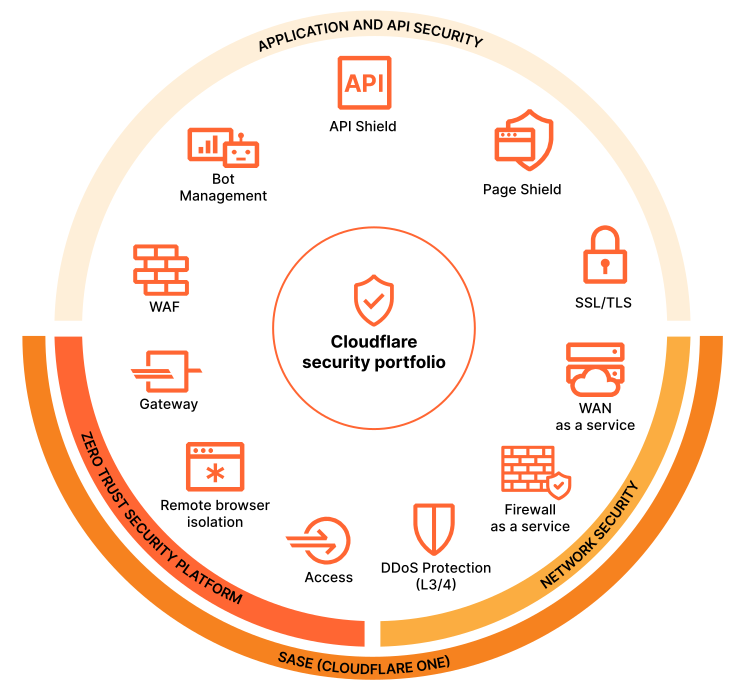
Cloudflare’s security toolkit includes several layers of protection:
- Web Application Firewall (WAF): Cloudflare’s WAF monitors incoming traffic and blocks known attack patterns in real time. It’s updated continuously based on threats identified across Cloudflare’s entire global network — meaning your site benefits from intelligence gathered across millions of other websites.
- DDoS Protection: A Distributed Denial of Service attack floods a website with traffic until it becomes unavailable. Cloudflare’s network is large enough to absorb and neutralize these attacks automatically, keeping your site online regardless of the volume of attack traffic directed at it.
- Bot Management: Cloudflare distinguishes between legitimate automated traffic (search engine crawlers, uptime monitors) and malicious bots (scrapers, credential stuffers, spammers), allowing the former and blocking the latter.
- SSL/TLS Encryption: Cloudflare makes it straightforward to ensure all traffic to and from your site is encrypted — protecting your visitors’ data and maintaining the trust signals (like the padlock in the browser bar) that users and search engines both expect.
- Zero-Day Threat Response: When a new, previously unknown vulnerability is discovered in widely-used software, Cloudflare can deploy protective rules across its entire network within hours — often before the software developer has even released a patch.
“Because Cloudflare’s network sees such an enormous volume of global traffic, it identifies emerging threats faster than any individual provider could — and deploys protection automatically across every site it serves.”
Performance: Security Doesn’t Have to Come at the Cost of Speed
A common concern when adding a security layer to a website is that it will slow things down. With Cloudflare, the opposite is typically true. Because Cloudflare operates a global network of data centers — over 300 locations worldwide — it can serve cached versions of your content from whichever location is physically closest to each visitor.
The performance benefits include:
- Content Delivery Network (CDN): Static content like images, stylesheets, and scripts is cached and served from the nearest Cloudflare location, dramatically reducing load times for visitors who are geographically distant from your server.
- Smart Routing: Cloudflare automatically routes requests along the fastest available internet path, reducing latency even for content that can’t be cached.
- Reduced Server Load: By filtering out bot traffic and serving cached content, Cloudflare significantly reduces the number of requests your server has to handle — which means faster response times for real visitors, even on busy days.
Reliability: Staying Online When Things Go Wrong
Even the most reliable web servers experience downtime occasionally — hardware failures, software issues, unexpected traffic spikes, or scheduled maintenance all create moments where your site might otherwise go offline. Cloudflare provides a buffer against these events.
When Cloudflare detects that your server is unavailable, it can serve a cached version of your site to visitors rather than showing an error page. It can also balance traffic across multiple servers if your infrastructure supports it, and its DNS management capabilities ensure that domain-level changes (like moving to a new server) propagate faster than standard DNS would allow.
Additional Capabilities Worth Knowing About
Beyond the core security and performance functions, Cloudflare offers a number of additional tools that we regularly use for clients depending on their specific needs:
- Cloudflare Turnstile: An invisible CAPTCHA replacement that protects forms from AI-powered spam bots without creating any friction for real visitors. (We’ve written a dedicated post on this — it’s worth a read.)
- Access Controls: Restrict access to specific areas of your site by IP address, geographic region, or user authentication — useful for protecting admin areas, client portals, or staging environments.
- Analytics & Traffic Insights: Cloudflare provides detailed visibility into your traffic patterns — including how much of it is automated — which helps inform both security decisions and broader website strategy.
- Email Security: Cloudflare’s DNS management includes tools to help properly configure email authentication records (SPF, DKIM, DMARC) that reduce the likelihood of your domain being used in phishing attacks and improve email deliverability.
Is Cloudflare Right for Your Website?
In our experience, the answer is yes for the vast majority of business websites. Cloudflare offers a free tier that covers the core security and performance features — which is why we’re comfortable recommending it as a baseline for almost every site we work with. More advanced features, suited to higher-traffic sites or businesses with more specific security requirements, are available through paid plans.
The setup process is straightforward when handled correctly — it primarily involves updating your domain’s DNS settings to route traffic through Cloudflare’s network. That said, the configuration decisions made at setup have real implications for how your site performs and how well it’s protected. Getting it right from the start is worth the investment.
If your site isn’t currently using Cloudflare — or if it was set up a while ago and hasn’t been reviewed since — it’s worth a conversation about whether your current configuration is still serving you well.
Ready to get Cloudflare working for your website?
We handle Cloudflare setup, configuration, and ongoing management for clients across a range of industries and website types. Whether you’re starting from scratch or looking to get more out of an existing Cloudflare setup, we can help. Get in touch and let’s talk about what makes sense for your site.