

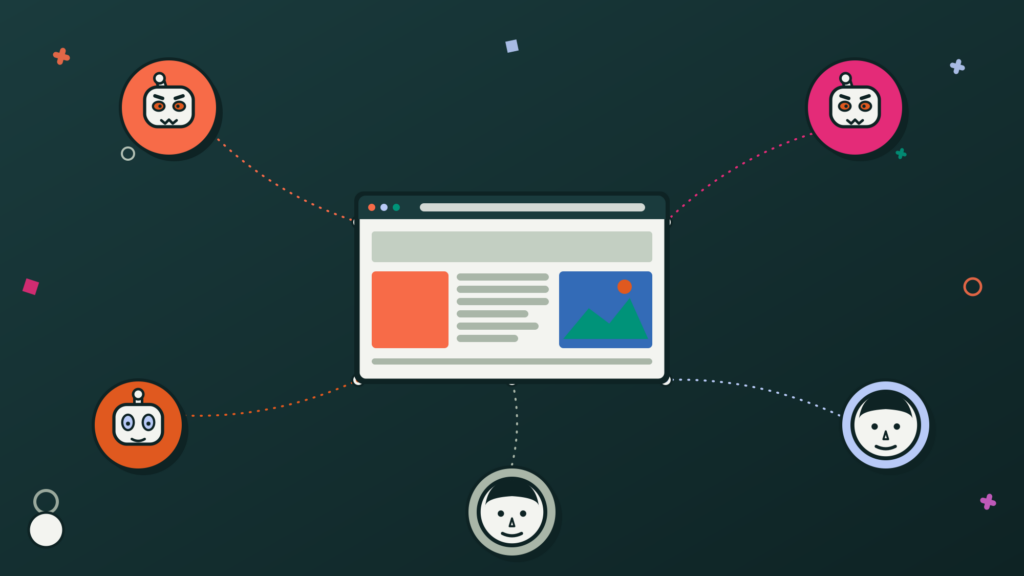
You’ve probably never thought much about where your website traffic actually comes from. But if you looked under the hood, you might be surprised (and frankly a little concerned) by what you’d find. A growing share of the traffic hitting websites every day isn’t from people at all, it’s from a digital pest we like to call bots.
TL;DR: Website Bot Traffic: More than half of all web traffic today isn’t human, it’s bots, and a growing share of them are malicious. From credential stuffing to DDoS attacks, these bots exploit gaps that basic hosting protections and security plugins can’t catch. Cloudflare closes that gap by inspecting and filtering traffic before it ever touches your server, giving small and mid-sized businesses the same level of protection once reserved for large enterprises.
More Than Half of Internet Traffic Isn’t Human
According to Cloudflare’s own network data (one of the largest internet infrastructure networks in the world) automated bot traffic now accounts for a significant and growing portion of all web traffic globally. Some estimates put it at well over half. That means on any given day, more requests may be hitting your website from automated programs than from actual customers.
The good news is that not all of it is malicious. Search engine crawlers, uptime monitors, and accessibility tools are all technically “bots,” and they serve a useful purpose. In fact, those types of “bots” are welcome and encouraged. The problem is that a large and increasing share of automated traffic is designed with harmful intent, and the businesses on the receiving end often have no idea it’s happening.
The rise of AI tools has accelerated this problem significantly. Automated attacks that previously required technical expertise can now be launched with minimal effort and at a scale that wasn’t practical even a few years ago. For small and mid-sized businesses without dedicated IT security teams, this creates a big vulnerability.
What Malicious Bot Traffic Actually Does to Your Website
It’s worth being specific about what these attacks look like in practice, because the impact goes well beyond spam emails or fake form submissions. Here are the most common types of malicious bot activity affecting business websites today:
- Credential stuffing: Bots use stolen username and password combinations from data breaches elsewhere on the internet to try to break into accounts on your site. If any of your users reuse passwords (and let’s be real, many do) this works more often than you’d expect.
- Content scraping: Automated programs harvest your product listings, pricing, service descriptions, and other content, often to copy it to a competitor’s site or to feed AI training datasets without your knowledge or permission.
- DDoS attacks: Distributed Denial of Service attacks flood your website with so many requests that it becomes slow or completely unavailable to real visitors. For e-commerce businesses or service providers, even a few hours of downtime can mean significant lost revenue.
- Vulnerability scanning: Bots systematically probe websites looking for known software weaknesses. This includes things like outdated plugins, unpatched systems, and misconfigured settings, all of which can be exploited for a larger attack later.
- Form and account abuse: Beyond spam, bots create fake accounts, submit fraudulent orders, abuse promotional codes, and pollute your analytics data, making it harder to understand real customer behavior.
“The businesses most at risk aren’t the obvious high-profile targets. They’re the small and mid-sized companies that assume they’re too small to be worth attacking , and therefore invest the least in protection.”
Why Your Existing Defenses May Not Be Enough
Many businesses rely on their hosting provider or a basic security plugin to handle threats. These are a good starting point, but they have limitations. Hosting-level protections are typically designed to keep servers running, not to intelligently filter traffic. Security plugins can block known threats, but they’re reactive by nature. They help to protect against attacks that have already been identified, but are not so good at catching emerging ones.
The bigger problem is timing. Most bot protection only kicks in after suspicious traffic has already reached your website, which means it’s already used up server resources, potentially slowed your site down, and created risk, all before anything gets blocked. Protection needs to step in earlier, stopping bad traffic before it ever reaches your site.
Think of it like a bouncer who only checks IDs after everyone’s already inside the club. By then, the trouble-makers have already taken up space and caused problems. A good bouncer checks IDs at the door and prevents degenerates from getting inside.

How Cloudflare Stops Malicious Traffic Before It Reaches You
Cloudflare operates as a protective layer that sits between the internet and your website. When someone or something tries to reach your site, the request passes through Cloudflare’s network first. That gives Cloudflare the opportunity to inspect, analyze, and filter traffic before it ever touches your server.
This matters because Cloudflare’s network is enormous. It processes hundreds of billions of requests every day across millions of websites worldwide. That scale gives it something no individual plugin or hosting provider can match: a real-time, global view of threat patterns as they emerge. When a new attack technique surfaces anywhere in the world, Cloudflare identifies it and begins blocking it across the entire network, including your site.
Specific protections that Cloudflare provides include:
- Bot Management: Cloudflare distinguishes between legitimate automated traffic (like Google’s search crawler) and malicious bots, blocking the latter while letting the former through.
- Web Application Firewall (WAF): A continuously updated ruleset that blocks known attack patterns such as SQL injection, cross-site scripting, and other common exploits, before they reach your site.
- DDoS Protection: Cloudflare absorbs and neutralizes volumetric attacks at the network level, keeping your site available even under heavy attack traffic.
- Rate Limiting: Automatically throttles traffic from sources making an unusual number of requests in a short time period, a hallmark of automated attack behavior.
- IP Reputation & Threat Intelligence: Cloudflare maintains a database of known malicious IP addresses and automatically blocks or challenges traffic from those sources.
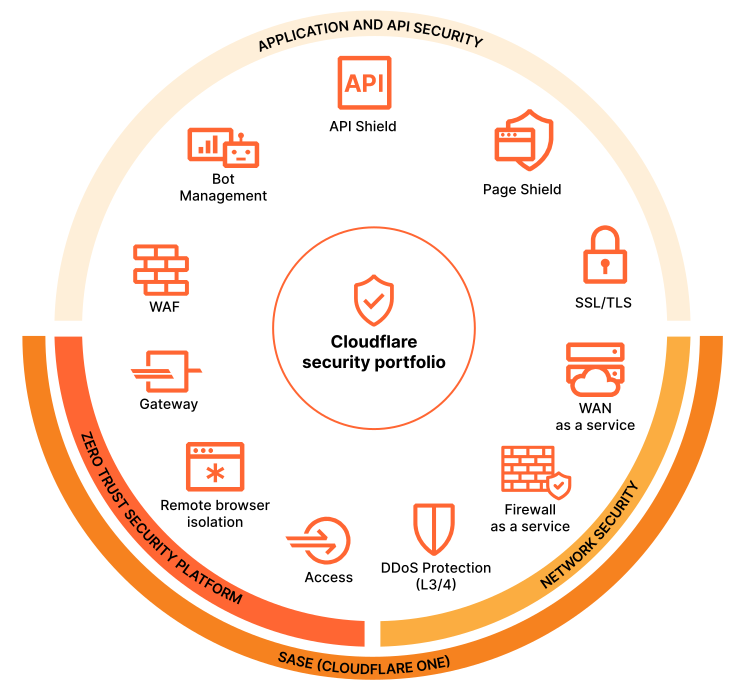
Image source: https://www.cloudflare.com/application-services/products/securitycenter/
The Business Case for Acting Now
The volume and sophistication of bot traffic is only going to increase over time. AI tools are making it cheaper and easier to launch automated attacks. Many small businesses incorrectly assume that these attacks are only aimed at large enterprises. That may have been the case in the past, but these days small and mid-sized business websites are just as much at risk (maybe even more so) because they’re less likely to have robust defenses in place.
The good news is that Cloudflare is accessible and affordable for businesses of all sizes. A basic configuration can be implemented relatively quickly and provides immediate protection. Then as time goes on, you can sprinkle in more advanced configurations that are suited to your specific site, traffic patterns, and risk profile.
If you’re unsure whether your site is already experiencing bot traffic issues, we recommend acting now to find out how vulnerable you are and what level of threat you’re dealing with. Most businesses wait until something goes visibly wrong but by then, the damage is already done. Don’t be that business, be smart and act now!
Key Takeaways
- More than half of all web traffic is now bots, and while some (search crawlers, uptime monitors, accessibility tools) are welcome, a growing share is malicious.
- Malicious bots show up as credential stuffing, content scraping, DDoS attacks, vulnerability scanning, and form/account abuse.
- Most existing defenses only react after traffic reaches your website, so the damage is already underway by the time anything gets blocked.
- Cloudflare inspects and filters traffic before it reaches your server, using bot management, a WAF, DDoS protection, rate limiting, and IP reputation intelligence.
- AI has made bot attacks cheaper and easier to launch at scale, so acting now is far cheaper than cleaning up after an attack.
Concerned About Bot Traffic Hitting Your Website? We Can Help!
We implement and configure Cloudflare for businesses of all sizes — from initial setup to advanced bot management and firewall configuration. If you’d like to understand what’s actually hitting your site and what you can do about it, we’re happy to start with a conversation. Reach out today for a free 30-minute strategy session.
Cloudflare & Bot Traffic FAQs
Unusual spikes in traffic, a rise in fake form submissions, slower load times, or spam accounts are all common warning signs. If you’re not sure, we can review your current traffic and flag anything suspicious as part of a strategy session.
No. Cloudflare’s security features work by routing your traffic through their network before it reaches your existing host, so your hosting and infrastructure can stay exactly as they are. It’s an added layer, not a replacement.
Cloudflare offers a range of plans, and many core protections are available even on lower-tier plans, but advanced bot management typically requires a paid plan. The right tier depends on your traffic volume and risk level, which is something we help assess during setup.
It’s rare, but no system is perfect. Cloudflare’s bot detection relies on behavioral signals and threat intelligence rather than simple blocklists, which keeps false positives low. When configured correctly, legitimate visitors typically never notice a difference.
No, typically the opposite. Cloudflare’s global network often improves load times by caching content closer to your visitors, while filtering out bad traffic before it ever reaches your server.
You don’t need in-house technical staff. Our team handles the setup, configuration, and ongoing tuning, so you get the protection without adding to your workload.